Imagine this: you’re managing a website with hundreds of thousands or even millions of pages. Product listings, blog posts, category pages, filters, tags… the list just keeps growing.
Now think about how long it would take a traditional crawler to scan every single page, gather data, and check for issues. Days? Maybe even a week?
That's time you don’t have.
When your site is this big, speed isn't just nice to have. It's critical. Every hour wasted waiting for a crawl to finish is an hour you're flying blind, unaware of technical issues, missed SEO opportunities, or broken experiences that could cost you traffic and revenue.
But what if you could cut that waiting time from days to just a few hours? Sounds like magic, right?
It’s not. It’s just smart engineering, powered by AI.
Our crawler is built for scale, speed, and smarts. It doesn’t just scrape pages one by one. It thinks. It plans. It adapts. It finds the fastest, most efficient path to crawl millions of pages without wasting time or bandwidth, and it does it all while spotting errors, collecting structured data, and giving you real-time insights.
In this guide, you’ll learn exactly how our AI-powered crawler pulls this off, step by step, in a way that’s easy to follow, no technical background needed.
What Is a Crawler and Why Speed Is Important
A crawler is a special kind of software that scans your entire website page by page, just like a search engine would. Its job is to collect data, find technical issues, and understand how your site is structured so you can improve your SEO performance.
Sounds simple, right? But here’s where it gets tricky: when you have a site with thousands or even millions of pages, crawling becomes a huge task. That’s where speed becomes a major factor.
You don’t want to wait two or three days just to see what’s wrong with your product pages or why your rankings suddenly dropped. You want that information now, and a fast crawler makes that possible.
Let’s break it down a bit more.
When you run a crawl, the tool starts at your homepage or a sitemap and follows every link it finds, like a digital spider moving through every thread on your site. It checks your page titles, metadata, status codes, redirects, internal links, and more. It’s trying to see what Google sees.
If your crawler is slow, you’re always playing catch up. You’ll find out about broken links or slow loading pages after Google already noticed them. Not great.
But when the crawler is built with AI powered speed, like our platform, it doesn’t just go page by page. It processes hundreds or thousands of pages at a time, in parallel. This gives you near real time feedback on how your website is performing, which is especially useful for GEO optimized websites, where performance can vary based on regional content, technical setups, or localization tags.
Here’s another reason why crawler speed matters. Search engines don’t wait for you to fix things. If there’s a broken canonical tag or a page being blocked by mistake, it can hurt your visibility across multiple markets.
Faster crawling means faster fixes, and faster fixes mean faster wins in SEO. It’s that simple.
Plus, if your business operates across different countries or languages, a slow crawler might miss entire regional sections due to timeouts or incomplete scans. That’s not a risk worth taking.
So to sum it up, a crawler is your digital audit assistant. The faster and smarter it is, the quicker you can make SEO decisions that actually move the needle. And when you’re managing a large or GEO targeted site, speed is not just helpful, it’s essential.
The Role of SEORCE’s AI-Powered Technical Suite
When you want to crawl a website fast, deep, and intelligently, the SEORCE AI‑Powered Technical Suite is the engine that makes it happen.
In simple terms, this suite combines smart crawling, automated issue detection, and data‑driven insights under one roof, so you don’t have to guess what’s going on with your site’s technical health. You see it and act on it immediately.
Think of it as your technical SEO command center. It's not just a tool that checks for errors, but one that understands the structure of your website, prioritizes what matters, and helps you fix it faster.
Here’s what makes it special for you:
1. Deep Crawling Power That Scales
Right from the start, SEORCE’s technical suite gives you enterprise‑grade site crawling, meaning it can scan large websites deeply and efficiently. This isn’t just basic page fetching.
It uses AI‑driven crawl logic to identify how your site is built and what needs attention first. It figures out the smartest path to crawl your site so you don’t waste time on irrelevant pages.
Because this process is intelligent rather than random, the crawl results are more meaningful and actionable every time you run it.
2. Intelligent Issue Prioritization with Tech Audit Pro
Once pages are crawled, the suite doesn’t just list problems. It ranks them by importance.
With Tech Audit Pro, you get automated issue prioritization so you can focus on the problems that have the biggest impact on your SEO performance.
This means you can fix things like broken links, crawl errors, or speed bottlenecks in the right order rather than whatever shows up first. It saves you time and effort, especially when you’re dealing with thousands or millions of URLs.
3. Smart Crawl Architecture Analysis
The suite doesn’t stop at crawling. It actually analyzes how search engines see your site. It looks at your crawl paths, indexation efficiency, and page structure, giving you insights into how well search engines are digesting your content.
This helps you spot hidden technical issues that might be affecting your visibility in Google, Bing, or global search results.
These are things you might otherwise miss without deep analysis.
4. Built‑In Support for Modern Web Technologies
Modern websites load content in complex ways, sometimes via JavaScript or dynamic elements.
SEORCE’s suite supports this with features like JavaScript rendering support so you don’t miss content that only appears after JavaScript runs.
This is important because traditional crawlers might miss these pages. SEORCE ensures what search engines actually see is what you see in your reports.
5. Structured Data and UX‑Focused Insights
Beyond crawling and issue detection, the suite also checks structured data and page performance metrics. It gives you feedback on things like schema accuracy and user experience signals.
That means you get both technical SEO guidance and user‑experience cues in one place.
As a result, you can improve both ranking signals and how real users interact with your site.
How Our Crawler Works Step-by-Step
Our crawler doesn’t wander randomly. It works in a smart, structured way that lets you scan millions of pages fast and with real insights into your site’s health. It blends deep site crawling with technical analysis and AI guidance so you see what matters the most without waiting for days.
Let’s break it down into a simple, step-by-step process so you can picture exactly what’s happening when your crawl runs, especially if you’re managing large markets or big sites.
1. Build a Smart Crawl Plan
Your crawler doesn’t just jump into your website randomly. It starts with a clear, smart plan so it knows exactly which pages to visit and in what order.
This means you get a focused crawl that finds the most important content first, rather than wasting time exploring pages that don’t matter.
When the crawler begins, it looks at key signals that help it understand your site’s structure.
It uses things like your sitemap and your internal links to build a map of your site before it even starts crawling. This initial setup helps the crawler avoid missing pages that matter and ensures it doesn’t get stuck on paths that lead nowhere.
Because this planning happens before the crawl really begins, the whole process becomes much faster and more accurate.
Instead of aimlessly exploring, the crawler follows a strategic route that covers all the key areas of your site. This smart planning is what powers speedy and meaningful results.
In short, a smart crawl plan is your first and most important step to fast, efficient, and AI-driven crawling that gives you real insights, not just raw data.
2. Fetch Pages in Parallel
The crawler doesn’t fetch one page at a time. It grabs many pages simultaneously, which helps you scan large websites fast and efficiently. This is one of the reasons the crawler can cover millions of pages without slowing down.
When you start a crawl, you want results quickly, not hours later with incomplete data.
So instead of waiting for one page to finish before starting the next, the system opens many fetches at once.
That means it’s working on lots of pages at the same moment, kind of like having multiple hands gathering information at the same time.
This parallel approach does two big things for you.
- First, it saves time because the crawler isn’t stuck waiting on a slow response from a single page.
- Second, it makes the crawl more efficient, so it can cover large swaths of your site without unnecessary waiting.
You don’t have to manage this. The platform’s infrastructure is designed to handle this level of throughput automatically as part of its deep crawling power.
So when your crawler runs, it’s not crawling page by page like an old flashlight looking at one corner at a time.
Instead, it’s more like a floodlight that scans many pages at once, letting you see issues and insights fast and on a large scale. That’s a key reason it can get through huge sites in hours instead of days.
3. Render and Understand What It Sees
Our crawler doesn’t just load your pages. It fully understands them the way a real search engine does, even when content appears after the page loads.
This matters because if content isn’t truly seen, it can’t be evaluated, ranked, or fixed properly.
Now let’s break that down in a simple way.
When your site loads content dynamically, a basic crawler may only see a partial page. That’s a problem, right? Because if important text or links load later, they’re invisible to weaker tools.
Our crawler renders the page, meaning it waits and observes how the page actually appears. You get a view of your site as search engines see it, not a stripped-down version missing key content.
This step ensures nothing important is skipped, misread, or ignored.
Once the page is fully visible, the AI shifts into understanding mode. It looks at how content is structured, how links connect pages, and whether anything feels off.
Instead of just collecting data, it interprets patterns and flags issues automatically. You don’t have to guess what went wrong or dig through raw information.
Here’s what the crawler actively checks during rendering:
- Whether important content actually appears on the page
- If internal links are visible and usable
- If pages behave consistently when loaded
(This happens quietly in the background, without slowing the crawl.)
The real value here is confidence.
You know the crawl results reflect your real site, not a broken or incomplete version. And that means the insights you get are accurate, actionable, and safe to trust.
In short: If your content exists, our crawler sees it. If it loads late, our crawler waits. If something looks wrong, the AI catches it.
That’s how rendering turns fast crawling into smart crawling.
4. Detect Issues and Give Actionable Feedback
When the crawler finishes scanning your pages, it doesn’t just hand you a long list of raw numbers and errors.
Instead, it highlights the problems that really impact your SEO performance and gives you guidance on how to resolve them.
This happens in two connected steps:
- First, the system detects issues like broken links, crawl errors, spam scores, and technical problems that slow down indexing. These are the things search engines don’t like and can hurt your visibility.
- Then, it translates those issues into feedback you can use. Rather than leaving you guessing what to fix first, the platform shows which problems matter most and what to do next. You get clear suggestions, not confusing lists.
This makes your life easier because you don’t have to spend hours figuring things out. You get prioritized feedback so you can start improving your site with confidence.
The sequence feels natural. You see the issue, understand its impact, and get guidance on how to fix it, all without needing deep technical knowledge.
That’s what makes the insights actionable instead of just informative.
5. Organize and Share What You Learn
This step is about turning all the data your crawler collected into useful information you can actually use right away and then making it easy for you or your team to see and act on it.
Once the crawl is done, the system takes all the pages it checked, the issues it found, and the patterns it detected and puts them into clean, organized views.
Instead of giving you a big pile of raw numbers, it bundles everything into dashboards and reports that tell a story about your site’s health, performance, and opportunities.
These dashboards don’t just show data. They help you understand trends, spot priorities, and make decisions faster. For example, you can see page issues, SEO metrics, rankings, and performance all in one place so you don’t have to jump between tools to figure out what’s happening.
Then comes the sharing part.
Once your crawl results are laid out in easy-to-read charts, tables, and summaries, you can share those insights with others such as teammates, stakeholders, or clients without them needing to dig into complicated reports themselves.
Some platforms even let you set up white label dashboards and scheduled reporting so that your insights can update automatically and stay current without manual work.
This step turns your crawl effort into something practical. Not just numbers, but actionable SEO intelligence. It ensures you and your team always know what’s working, what needs fixing, and where you should focus next.
How Data Is Organized After the Crawl
After our AI‑powered crawler finishes scanning every page on your site, the next question is: what happens to all that data?
Instead of dumping a giant spreadsheet on you, the system organizes everything in meaningful ways so you can understand it quickly and act on it right away.
First, think of the Performance Dashboard as your command center.
This is where the hard work of crawling turns into something you can actually use. The dashboard collects the most important signals, such as site health issues, ranking changes, traffic patterns, and content performance, and puts them in one place.
Imagine opening a report and instantly seeing what matters most without digging through raw logs. That is what this system does. It takes the raw crawl output, including URLs, technical issues, broken links, structured data errors, and speed problems, and layers them into clear summaries and visuals that tell you where your site is strong and where it’s weak.
In this organized view, you’ll usually see sections like:
- Technical issues ranked by impact, so you know what to fix first.
- Trend visuals for things like traffic or visibility, making it easy to spot improvements or declines.
- Content performance insights showing which pages bring value and which could be improved.
Instead of a wall of numbers, you get context. For example, a broken link isn’t just listed. It’s tied to where it sits in your site structure and how it might affect rankings or user experience.
And the best part? This organization happens automatically. You don’t need to be an analyst to understand it. The system uses intelligence built into the platform to build these insights for you, so you can focus on strategy, not data cleanup.
In short, after a crawl:
- Raw data is turned into structured summaries that make sense at a glance.
- Issues are highlighted by importance, not volume.
- Dashboards help you explore trends and performance, not just static numbers.
This is why the crawl isn’t the end. It’s the start of insight. And with organized data, you can act faster, fix smarter, and optimize with confidence.
Why This Matters for Large Sites
When your website has hundreds of thousands or even millions of pages, crawling isn’t just another task. It becomes a core part of your SEO success. That’s because you need to see what’s going on across your entire site quickly, not weeks later when problems have already piled up.
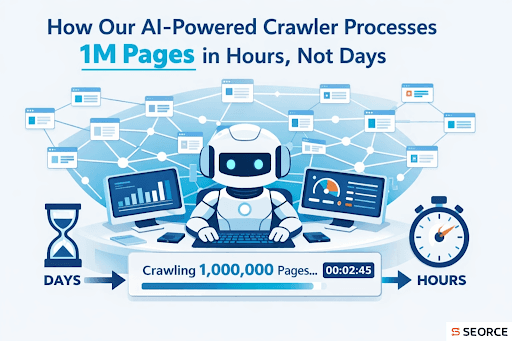
With a crawler built to handle scale, like the one in the SEORCE Technical Suite, you get a full picture of your site in hours instead of days, which means you can act fast.
SEORCE’s platform is designed to work at enterprise scale, so it processes millions of pages and identifies technical issues instantly instead of waiting for long, slow scans.
When you finish crawling faster:
- You spot issues sooner. Broken links, indexation gaps, and slow pages let you see problems while they are still small.
- You fix them before they hurt rankings. If a search engine can’t crawl your pages properly, it won’t index them well. Fast crawling helps you stay ahead of that.
- And because SEORCE shows real‑time visibility into everything in one place, you don’t waste time stitching tools and dashboards together. You focus on action.
This matters because search engines reward sites that are easy to crawl and index. If your crawler is slow or incomplete, you might miss hidden issues that could lower your visibility. A powerful crawler that scales with your site keeps your SEO aligned with business growth and not slowing behind it.
So, in simple terms:
For big sites, speed isn’t a luxury. It’s a necessity. Faster crawling means faster insights, faster fixes, and better search performance overall.
Tips for Getting the Most Out of Your Crawler
So, you’ve got a powerful AI-driven crawler at your fingertips.. Now what? It’s not just about turning it on and letting it run. To really unlock its full potential, you need a smart strategy behind it.
Let’s break down how you can make the most of it quickly, clearly, and without any tech fluff.
1. Schedule Regular Crawls (Consistency is everything)
If you're only crawling your site once in a while, you're flying blind.
Websites change all the time. Sometimes it’s new pages, updated content, or something breaking in the background that you didn’t even notice. That’s why running regular crawls isn’t optional. It’s essential.
When you set up a consistent schedule, like once a week or every few days, you stay in control. The crawler checks your entire site and gives you a fresh report each time. That means you’re always working with the most accurate and up-to-date information.
You don’t have to guess if a broken link popped up or if a page suddenly slowed down. You’ll know almost immediately.
And here’s the best part. You can automate all of it.
Just choose how often you want it to run, and it handles the rest. You don’t need to remember. You don’t need to manually trigger anything. The system quietly works in the background and alerts you only when something needs your attention.
This saves you time, helps you catch problems early, and keeps your site in top shape.
Because in SEO, staying ahead is always better than catching up.
2. Use AI Recommendations (They’re there for a reason)
Once your crawler finishes scanning your site, you’ll get a lot of information. Some of it might seem overwhelming at first. You’ll see things like broken links, missing tags, slow pages, and more.
But here’s where the best thing happens: AI doesn’t just show you the issues. It tells you what to fix first.
That’s a huge time-saver.
Instead of sifting through every warning or trying to guess what’s urgent, the AI organizes your results by what’s most important for performance and visibility. It ranks the issues based on real impact, not just volume.
You’ll get clear, guided suggestions like:
- Fix these broken links on high-traffic pages
- Optimize this slow-loading product page
- Add missing meta tags to your top 10 landing pages
- Resolve duplicate content on these category URLs
With that kind of clarity, you can stop guessing and start improving faster.
It’s like having an SEO strategist built right into your tool. You don’t need to be technical, and you don’t have to spend hours analyzing reports.
You just need to trust the AI because it’s trained to spot what matters most and help you act on it right away.
Use those insights regularly, and you'll see quicker wins without the usual trial and error.
3. Focus on High-Impact Pages First
Not every page on your site deserves the same amount of attention. Some pages bring in most of your traffic, leads, or conversions. Others barely get visited.
That’s why one of the smartest moves you can make is to start with your most valuable pages.
When your crawler finishes its scan, it gives you a full view of your site health. But instead of trying to fix everything at once, zoom in on the pages that matter the most to your business. These might be your homepage, key landing pages, product pages, or anything tied to real results.
By fixing issues on those pages first, you’ll see a faster return on your effort. Better performance, improved rankings, and more visibility tend to follow quickly because search engines notice when your important pages are in great shape.
The crawler also helps you spot which of those high-impact pages might be underperforming. Maybe a slow load time is dragging it down. Maybe it's missing structured data or internal links.
Once you know that, you can fix what's broken and strengthen what's already working.
It’s not about fixing more. It’s about fixing smarter. And this approach helps you do exactly that.
4. Monitor Crawl Metrics Over Time
Running a crawl once is great. But what really matters is what happens after.
If you’re not checking your crawl metrics regularly, you won’t know if your fixes are actually working. And without that visibility, it’s easy to fall back into old issues without even realizing it.
That’s why monitoring your site’s progress over time is just as important as fixing problems.
Each crawl gives you a snapshot of your website's health. When you compare those snapshots over time, patterns start to emerge. Are errors going down? Are pages loading faster? Is structured data improving?
These aren’t just numbers. They show you if your SEO efforts are paying off.
And here’s the real win. If something breaks again, maybe a developer changes a template or a new update causes an issue, you’ll catch it early. The crawler doesn’t sleep. It keeps watching, so you don’t have to.
The key is consistency. Watch your metrics grow, dip, or stabilize. Use those trends to guide your next move. Over time, this builds a stronger, faster, and more reliable website.
Stay in the loop, and your SEO will stay ahead.
Final Thoughts
So, if you’ve ever felt like crawling your massive website takes way too long, now you know it doesn’t have to. With an AI-powered crawler like ours, you’re not waiting days. You’re getting millions of pages processed in just hours.
That means more time to fix issues, boost performance, and focus on real SEO impact.
Everything works behind the scenes: fast, smart, and in real time.
Why waste hours clicking through reports or chasing broken links? Let your crawler do the heavy lifting.
You just act on the insights. Simple, right?
Whether you're running a store, blog, or huge enterprise site, this kind of speed gives you a serious edge.
And hey, who doesn’t want faster wins with less effort?
Frequently Asked Questions (FAQs)
1. What makes an AI‑powered crawler faster than a normal crawler?
An AI‑powered crawler uses smart planning and efficient processing to explore many pages at once and spot issues quickly. It doesn’t scan one page at a time like older crawlers. It uses scalable infrastructure to work fast on large sites.
2. Can an AI crawler handle JavaScript‑heavy websites?
Yes. Some advanced crawlers include JavaScript rendering support so you see content the same way search engines do, not just the raw HTML.
3. How does crawling speed affect my SEO work?
Faster crawling means you get data sooner, helping you spot problems, fix them, and improve rankings without waiting days for results.
4. Does a large number of pages slow down modern crawlers?
Not necessarily. With scalable infrastructure, modern crawlers can process huge site structures quickly, even with millions of pages.
5. What kind of issues can a crawler find when it scans my site?
Crawlers usually check for broken links, sitemap and robots rules, page performance, and internal linking structures so you can improve site health and visibility.